
Inventory Write-off
လုပ်ငန်းမှကုန်ပစ္စည်း အပျက်စာရင်းများ ၊ Expire ဖြစ်၍ သုံး၍ မရနိုင်သော ပစ္စည်းများ ၊ Damage ဖြစ်သောကြောင့် ပြန်လည်အသုံးပြု၍ မရသော ပစ္စည်းများအား ကုန်ပစ္စည်းစာရင်းထဲမှ နုတ်ရန်အတွက် Inventory Write-off ထည့်သွင်းနိုင်ပါသည်။
Inventory Write-off >> New Inventory Write-off
-
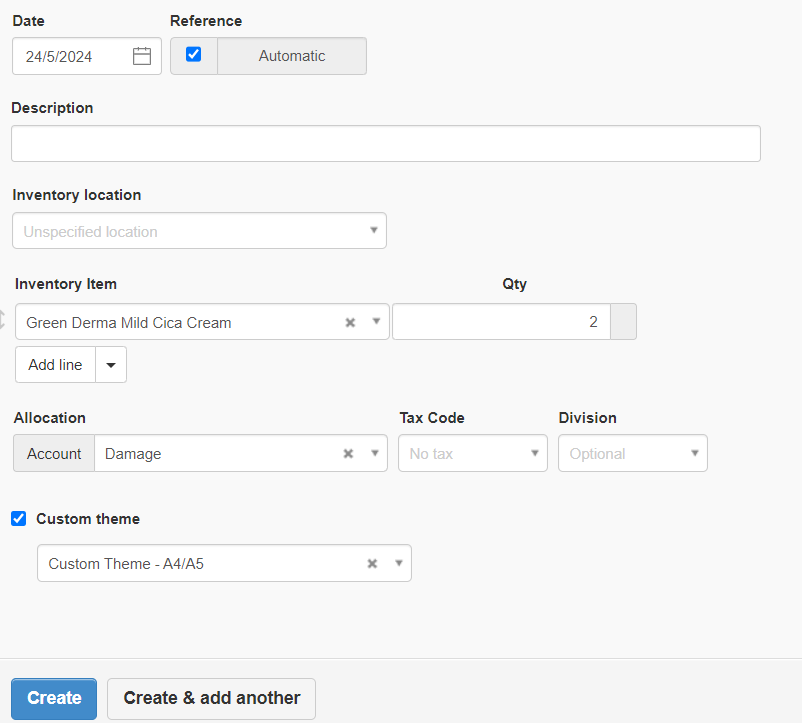
Date တွင် Write-off လုပ်မည့်နေ့ကိုထည့်ပါ။
-
Inventory Location သတ်မှတ်ထားတာရှိပါက သက်ဆိုင်ရာ Location ကိုထည့်ပါ။
-
Inventory Item တွင် ပစ္စည်းနုတ်မည့် Item အားရွေးချယ်ပါ။
-
Qty တွင်လျော့ချမည့်အရေအတွက်ကိုထည့်ပါ။
-
Allocation တွင် လျေ့ာချလိုက်သော Item ကို မည့်သည့် Account ဖြင့်စရိတ်ကျခံမည်ကိုထည့်ပေးရပါမည်.
-
Create ကိုနှိပ်ပါ။
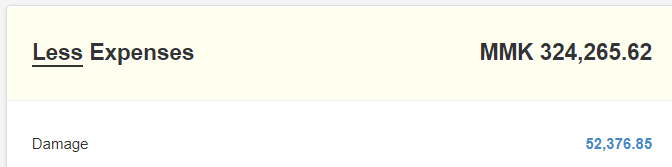
Summary တွင်ကြည့်ပါကလည်း သက်ဆိုင်ရာ Expense Account တွင် စရိတ်လာပြသည်ကိုတွေ့ရပါသည်။
Last updated 3 months ago
Was this helpful?